I’ve been developing software to assist player piano and, in particular, Yamaha Disklavier owners with common problems. I independently develop these tools, and they are still in active development. If you have any notes, please don’t hesitate to contact me to report bugs or request features.
APS MIDI Prep Tool
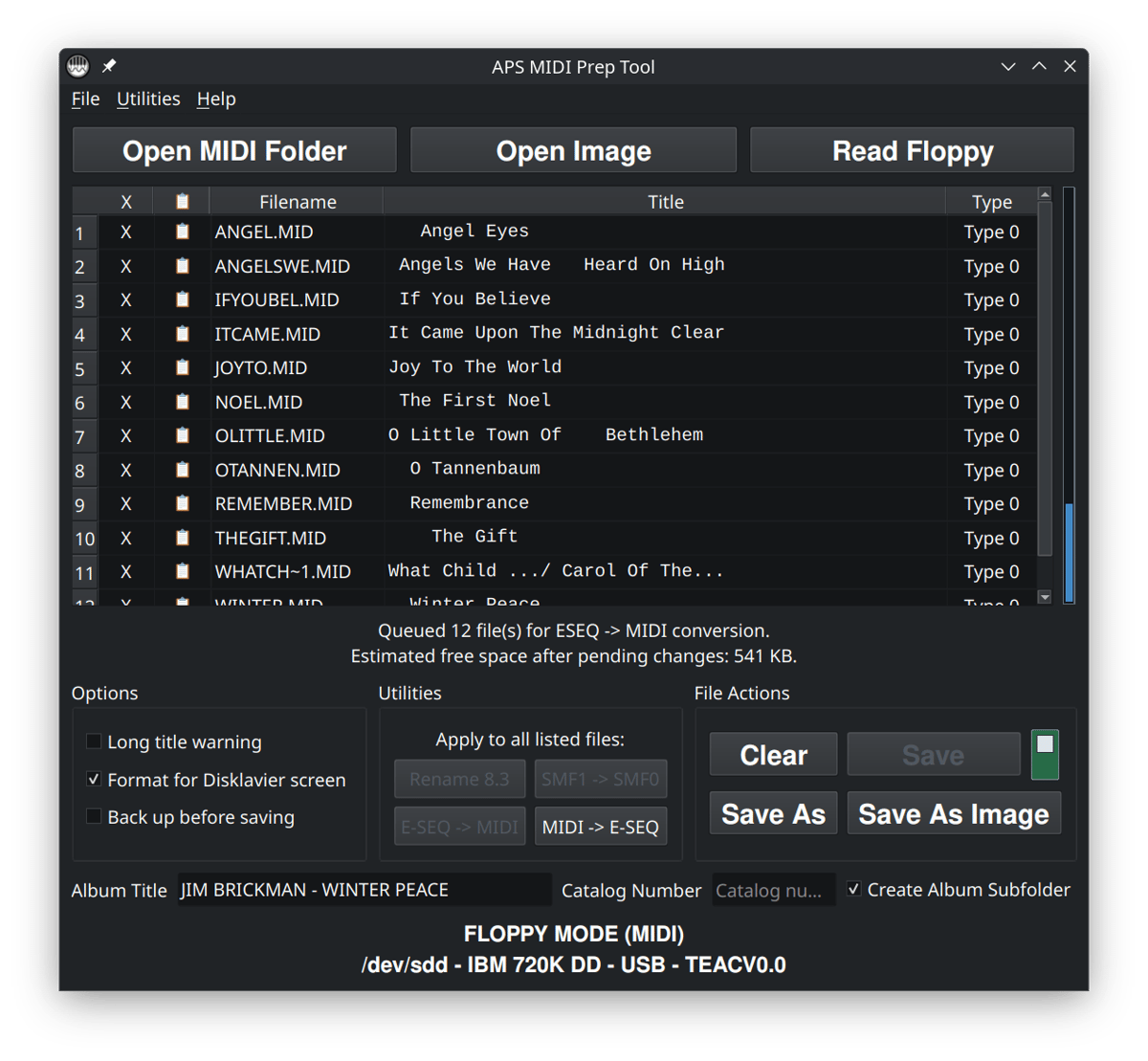
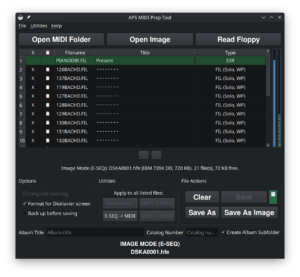
APS MIDI Prep Tool is a modern Windows/Linux utility for preparing Yamaha Disklavier MIDI, E-SEQ, PIANODIR.FIL, floppy, HFE, Nalbantov, Gotek, and Greaseweazle workflows in one place. It can read and write Yamaha Disklavier floppy disks, even if they’re slightly damaged.
- Read floppy disks, including Yamaha PianoSoft disks. APS MIDI Prep Tool can read most Yamaha PianoSoft floppy disks on both Windows and Linux, using built-in error correction and advanced recovery workflows to recover disks that ordinary methods and older software often can’t.
- Convert MIDI to E-SEQ and E-SEQ to MIDI. APS MIDI Prep Tool supports bidirectional MIDI/E-SEQ conversion for supported Yamaha/Disklavier workflows, and can generate or refresh
PIANODIR.FILwhen appropriate. - Change the displayed title of a MIDI file. If the name of a song isn’t appearing correctly on your player piano screen, this allows you to change the names of each song in a quick, efficient manner.
- Convert Type 1 MIDI files to Type 0 for reliable Disklavier and player-piano playback. Older systems often can’t understand Type 1 MIDI files. Even newer systems may not always interpret multiple tracks the way you expect. If you’re having trouble with a MIDI file missing notes, this may be your issue.
- Shorten filenames in bulk for use on older player pianos. Many older systems would not work with longer filenames beyond eight characters in length. This allows for wider compatibility.
This tool includes the features of both APS MIDI Title Editor and APS Shortener. Since the last version of these tools, there have been significant performance improvements.
APS MIDI Prep Tool
Latest version: v0.8.7
You can download APS MIDI Prep Tool on GitHub.
It’s especially useful for Yamaha Disklavier owners who want their songs properly displayed on the instrument’s screen. There’s a full post about APS MIDI Prep Tool here.
This makes it easier to navigate and play back performances. With a quick and intuitive process, users can load a MIDI file, modify its track title, and save the changes.
Older versions
Legacy APS MIDI Title Editor: Version 0.1.1 64-bit Windows: Installer / Portable EXE
Legacy APS MIDI Shortener: Version 0.1.0 64-bit Windows: Installer / Portable EXE
APS NoteCast
APS NoteCast is an Android app I developed for playing and recording MIDI with Yamaha Disklaviers, other player pianos, digital pianos, keyboards, and MIDI-capable instruments. It connects wirelessly through Bluetooth MIDI adapters such as the CME WIDI Master, WIDI Jack, and WIDI Uhost, and can also use compatible USB MIDI devices.
- Play MIDI files and playlists directly from an Android phone or tablet. There’s no need to convert to E-SEQ or perform other complicated fixes.
- Connect to Bluetooth MIDI hardware through a simple scan-and-connect interface. The app supports Bluetooth MIDI and USB adapter.
- Import and organize MIDI files for regular playback using playlists. Playlists allow you to put together collections of songs and play them conveniently.
- Record incoming MIDI performances and save them as standard MIDI files.
- Control playback with play/pause, stop, seek, tempo, transpose, and volume controls.
APS NoteCast is now available for public download on the Google Play Store!

APS NoteCast is particularly useful for adding convenient phone or tablet playback to a Disklavier or other player-piano system without replacing the original controller.
Like most of my tools, APS NoteCast is free and open-source. The source code and alternative Android installation files are also available through GitHub.
Online Tools
Roland Power Adapter Lookup
Trying to figure out where to purchase a power adapter for your Roland, or which one you even need? I’ve written a utility that will look up the appropriate Roland adapter, complete with links to reputable and inexpensive dealers.
Floppy Image Conversion Tool
I’ve written an online utility that allows you to convert between HFE and IMG files, as well as many other formats. It also allows you to extract all the files from your floppy disk image. You can use the floppy image conversion tool here. This is useful for floppy disk emulators such as a Nalbantov or Gotek USB emulator. This tool can convert many Yamaha PianoSoft disk images and can extract files when the filesystem and directory can be read.
Yamaha E-SEQ ⇄ MIDI Converter
Convert Yamaha Disklavier .FIL and compatible Clavinova or CVP .MDA files to Standard MIDI directly in your browser. The converter can also convert MIDI Format 0 or Format 1 files back to Yamaha E-SEQ as either .FIL or .MDA.
No installation is required. Files are processed as temporary copies, and Disklavier users can also create coordinated song sets containing a generated PIANODIR.FIL. For physical floppy disks, disk images, damaged-media workflows, Gotek or Nalbantov preparation, and more advanced editing, use APS MIDI Prep Tool instead.
“Why Won’t This MIDI File Play?” Tool
Diagnose common MIDI and Disklavier compatibility problems and fix them, all with one tool. Check file type, format, track structure, channels, Yamaha-specific data, and other issues that can keep a song from playing correctly.
MIDI Type 1 to Type 0 Conversion Tool
I recently wrote a utility that converts MIDI files from Type 1 to Type 0. This means that it converts multitrack MIDI files into a single-track Type 0 MIDI file. It provides a solution to the common complaint that the Disklavier is playing “only one hand” of a piece. You can also use APS MIDI Prep Tool if you’re looking for an offline or bulk solution. It also supports merging all instruments onto the piano channel.
Online MIDI Player
Play MIDI files directly in your browser to quickly check notes, timing, tempo, channels, and overall playback before using them on your piano or other MIDI device.
APS Pedal Softener
Use the APS Pedal Softener tool to analyze sustain-pedal CC64 data and determine whether a MIDI file uses binary or continuous pedaling. Binary pedal events can be converted into smoother, more natural ramps using Quick, Natural, Slow, or Custom settings. Supports individual files and batch processing entirely in your browser. This functionality is included in APS MIDI Prep Tool.
APS XF Stripper
Use APS XF Stripper to remove Yamaha XF data from one or more MIDI files while preserving notes, timing, tempo, and continuous pedal information. The tool creates clean, ordinary Standard MIDI Files for improved compatibility with Disklaviers and other MIDI players. I created this in response to issues with playback of some Yamaha PianoSoft downloads with the Yamaha E3 Disklavier. This is also included in APS MIDI Prep Tool.
Disklavier Compatibility Table
Use the Disklavier Compatibility Table to confirm what your system can actually play and record (E-SEQ vs. SMF0/SMF1). It’s an interactive, searchable table covering Disklavier controllers and the models commonly associated with them.
Yamaha GH3 Action Check
In my article Yamaha GH3 action substitutions, I include a tool for checking whether your Yamaha keyboard or digital piano has a GH3 action.
Cents and Hertz Conversion Tool
This is a neat tool for converting between cents and Hertz (Hz). You can use this tool to determine how many Hertz sharp or flat to set a Disklavier ensemble accompaniment, or to determine how many cents flat to tune a piano for A432!
HFE to Song List Tool
The HFE to Song List Tool automatically generates a numbered song list from an HFE file. Nalbantov USB floppy emulator systems store music in HFE disk images, which contain embedded MIDI or E-SEQ files.
This tool extracts the song titles directly from those embedded files and formats them into a clean, numbered list. It is especially useful for creating printable reference sheets, making large HFE collections much easier to browse and navigate. This tool also allows you to use AI to correct or optimize the list of names.
MIDI Search Tool
The article Free Song Downloads for your Disklavier includes a simple search tool that helps you search for MIDI songs on Google.
Other projects
I also maintain a few small open-source tools outside the piano world.
Switchboard
Switchboard is a self-hosted texting dashboard I built for managing multiple VoIP/SMS numbers through providers such as Telnyx and Twilio. This is the dashboard I built to communicate with my own piano tuning customers, and which I use on a daily basis. You can read more about it on my Switchboard page and download it on GitHub.
Mosaic Budget
Mosaic Budget is a self-hosted, zero-based budgeting app with automatic SimpleFIN transaction syncing, visual category-based budgeting, rules, and month-to-month planning. You can read more about it on my Mosaic Budget page, or you can download it on GitHub.
Miscellaneous Useful Files
Chromatic Scale MIDI File
When repairing Disklaviers, it’s often helpful to have them play a chromatic scale from the lowest A to the highest C. I’ve created a MIDI file that plays a chromatic scale—each key individually for one second at velocity 100. You can download the chromatic scale MIDI here.
Blank Nalbantov Virtual Floppy Disks
I have a complete article on blank Nalbantov virtual floppy disks here. These contain the file structure expected of 720 KB DD floppy disk formatted for Yamaha E-SEQ, and nothing else. You can download the blank E-SEQ floppy disk here.
Hello Robert! Thanks for the heads-up. This is probably a Windows SmartScreen warning, which often happens with software from independent developers—even when the software’s legitimate. APS Shortener is digitally signed with a valid certificate and has been available for about a year. If you downloaded it from my site, it’s safe. If Windows still blocks it, you can usually choose More info > Run anyway, or right-click the file > Properties > Unblock. Thank you!
Editor’s note: APS Shortener is now a deprecated, legacy tool. Please use APS MIDI Prep Tool instead.