Not sure why your MIDI file or other song won’t play on your Yamaha Disklavier? Run it through Why Won’t This Song Play? first to check the file and identify the most likely fix.
Song missing, silent, or playing only one hand? Check your MIDI files for common file and compatibility problems, then find the right next step.
ALEX'S PIANO SERVICE · FILE DIAGNOSTICS Choose MIDI or E-SEQ files to check for issues and download a converted copy when needed. Files stay on your device. Originals are never changed. Loading the checker...Check your song
Not sure which Disklavier to select? See the Disklavier compatibility table. Choose the controller installed on your piano now, including any upgrade.
Find the problem before converting
The checker looks for format and track issues, channel-routing problems, silent volume settings, long pauses, unusual tempo data, stuck-note or pedal conditions, and excessive metadata. It also checks recognized Yamaha XF data and flags possible XP-related concerns.
Results explain what was found, what may matter for your instrument, and which APS tool or troubleshooting step to try next. You can copy or download the report for help.
Why a Disklavier song may not play correctly
A MIDI file that works on a computer does not necessarily work correctly on a Yamaha Disklavier or other player piano. Different generations of Disklavier support different combinations of Standard MIDI files, Yamaha E-SEQ, PianoSoft formats, floppy disk formats, USB storage, and MIDI channels. Older systems in particular can be sensitive to file structure and formatting that modern MIDI software handles without complaint.
Common symptoms include a Disklavier song that will not play, appears as 0 seconds, skips immediately, plays only one hand, has missing notes, plays at the wrong tempo, or behaves differently after being copied to USB or floppy disk. The cause may be as simple as a Type 1 MIDI file that needs conversion to Type 0, but it can also involve channel assignments, Yamaha XF or XP data, unusually long pauses, controller data, pedal events, filenames, disk formatting, or compatibility with the particular Disklavier controller.
This checker is intended to narrow that down before you start converting files at random. Select your piano or player system, inspect the song, and use the report to identify the most likely problem. If you are unsure which Yamaha system you have, start with the Disklavier compatibility table.
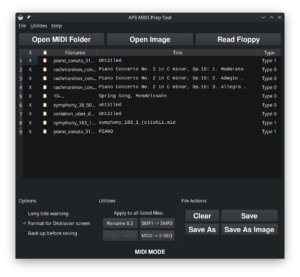
For files that need more extensive repair or conversion, APS MIDI Prep Tool can handle many Disklavier-specific MIDI, E-SEQ, floppy disk image, and PIANODIR.FIL workflows.
Common questions
Will it fix or change my file?
No. This is a read-only checker. Your original file is never changed, and your music stays on your device.
If the checker finds something that may need correction, it will point you to the appropriate APS tool or troubleshooting step.
Which instruments can I check?
The checker includes Yamaha Disklavier systems, selected PianoDisc and QRS controllers, and a general MIDI option.
If you are not sure which Disklavier controller you have, see the Disklavier compatibility table.
What kinds of files can it check?
Standard MIDI files receive the most detailed analysis. The checker can also inspect supported ZIP packages, FAT12 disk images, Yamaha song catalogs, and identify certain E-SEQ and HFE files.
E-SEQ and HFE inspection is more limited than MIDI inspection. When deeper analysis is needed, the report will point you to APS MIDI Prep Tool.
Can it detect Yamaha XF data?
Yes. The checker looks for recognized Yamaha XF metadata and will let you know when it is present and may be worth removing for compatibility.
Can it detect Disklavier XP data?
It can identify some signs that a file may contain or originate from Disklavier XP data, but XP detection is not definitive. If the recording came from a Disklavier PRO or XP-capable system, keep the original file before editing or converting it.
What if the song plays only one hand?
This is often a MIDI channel issue rather than a file-format problem. The checker looks at which channels contain notes and will tell you when channel routing is a likely cause.
What if the piano shows the song as 0 seconds or skips it?
That can happen when the controller does not understand the file structure, metadata, or format. The checker looks for several of the common causes and recommends the most appropriate next step.
What if every song fails?
If known-good songs also fail, the problem may not be the music file. Use the checker without selecting a file and choose the symptom you are seeing. It can help narrow the problem to the piano’s settings, MIDI connection, USB or floppy media, emulator configuration, or hardware.
Can I send you the results?
Yes. The checker can copy or download a diagnostic report that you can include when contacting me for help.