Mosaic Budget is a self-hosted, zero-based budgeting app that automatically imports transactions through SimpleFIN and lets you visually organize them into monthly spending categories.
I originally learned about zero-based budgeting from Dave Ramsey. The idea of zero-based budgeting is simple: You start with your income for the month, and then you assign every dollar a value. Dave Ramsey does actually have his own app, but I wanted a more private, self-hosted solution which could also establish automated rules.
I used Actual Budget for a while, which is self-hosted and has its own automated rules. However, it is not organized around a zero-based budget the same way as Dave Ramsey’s EveryDollar, and the interface is dramatically less user-friendly. It also doesn’t sync with your bank automatically, which can cause issues with transactions with some banks (like mine).
Mosaic Budget is the application I made to bridge those gaps.

The idea that became Mosaic: transactions as movable pieces
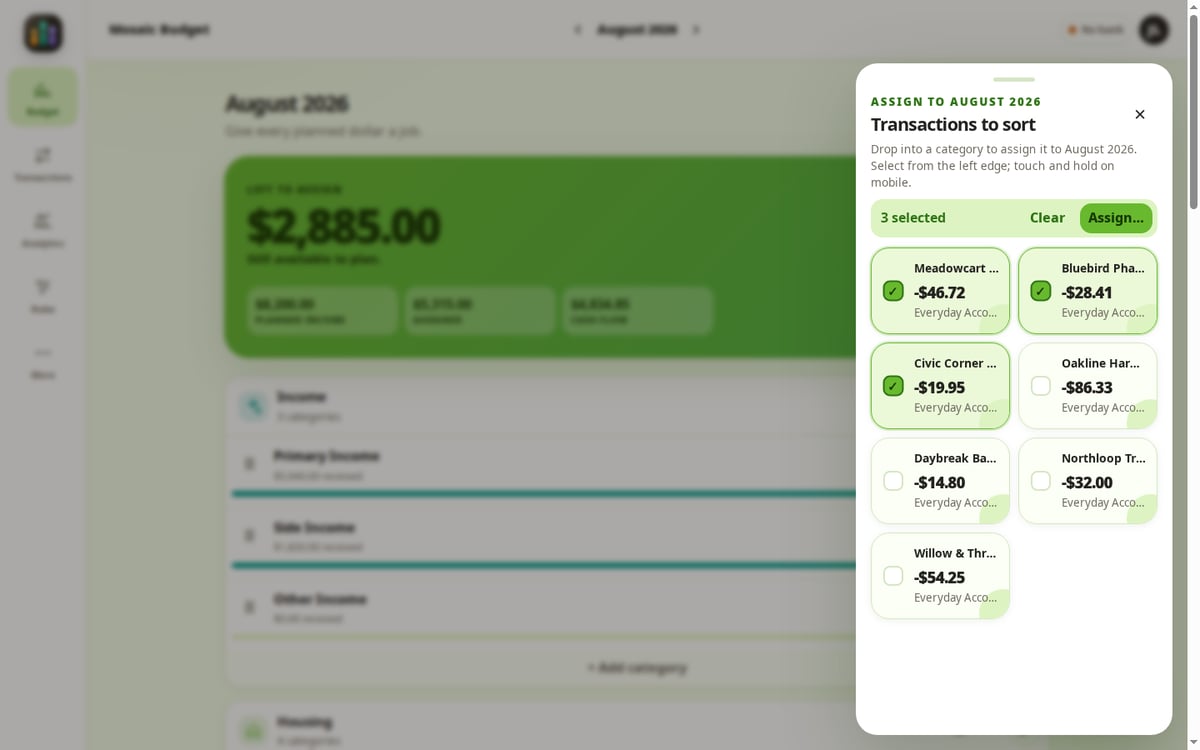
The central interaction came before most of the technical design. I imagined each new transaction as a bubble waiting in a tray. I could select one bubble, or several related bubbles, and move them into the category where they belonged. The budget would update immediately.
That is still the heart of Mosaic. SimpleFIN can retrieve transactions without requiring me to enter each one. Unassigned transactions appear together for review. On a desktop, they can be dragged. On a phone or with assistive input, they can be assigned by tapping. A purchase that spans several purposes can be split to the exact cent.

I wanted this review step to be fast and user-friendly. Making the experience of sorting transactions simple and tactile helps me quickly understand what’s happening with my finances.

Automation should remove repetition, not judgment
Some transactions are not worth reconsidering every month. The same payee may always belong to the same category. A merchant name may arrive from the bank in an ugly or inconsistent form. A recurring payment may need a tag, a cleaned-up payee, a review flag, or a predictable split.
Mosaic includes deterministic rules for those jobs. Rules are organized into explicit phases, can be previewed before they run, and can be placed in an exact order. That matters because financial automation should be understandable. I would rather know why a transaction was changed than have a mysterious model make a plausible guess.
Manual decisions take precedence. When a person deliberately categorizes a transaction, background rules do not silently overwrite that choice later. Automation is there to reduce repeated work, not to compete with the user.
You’re still fully in control of your transactions, using a combination of your own manual sorting, and procedural rules. I did not incorporate AI or any telemetry.

A real budget has to remember that months are different
Mosaic’s budget structure is month-aware. Sections and categories can begin in a chosen month, be hidden for a single month, end from a chosen month forward, or return later. Earlier plans and transactions remain intact. The current budget can change without rewriting its own history. This is a necessity, as I wanted to organize the app around planning where every dollar goes at the start of each month.
I wanted the phone experience to be a real workflow, not a compressed desktop
Transaction review often happens in short intervals: waiting for an appointment, sitting in the car, or checking the latest activity at the end of the day. That made mobile use central rather than optional.
The same monthly budget and sorting workflow adapts to a narrow screen. Touch-and-hold dragging is available, but tap-based assignment remains an equal path rather than a fallback. Mosaic can be installed as a progressive web app, and the repository also includes an Android companion that connects to the user’s own Mosaic server.


Budgets do not have to look like tax software
I also wanted Mosaic to feel calm and inviting, and very friendly. Financial information is serious, but the interface does not need to be gray, punitive, or exhausting. Mosaic includes several bright themes along with light and dark preferences, density controls, text sizing, and reduced-motion support. Those choices are stored per user, so two people in the same household do not have to use the application in exactly the same way.

What Mosaic is today
Mosaic is a working open-source application. The repository includes the browser interface, API, PostgreSQL database, background synchronization worker, migrations, automated tests, notification delivery, backup and restore verification, demonstration data, the installable web app, and the Android companion.
It also includes transaction search and editing, exact splits, manual cash transactions, rollover funds, deterministic rules, analytics, multiple household users, conflict detection, a persistent incident center, SMTP and ntfy notifications, duplicate-feed protection, and several deployment and security guides.

Mosaic is deliberately online-first and does not queue financial changes while offline. Formal transfer pairing and full account-reconciliation workflows are not yet complete accounting subsystems.
Why I released it
I was very surprised I couldn’t find a budgeting application that met my needs. There were many different apps that came close, but weren’t quite right. I wanted to share it so that everybody else could enjoy it too!
Releasing the source makes the promises inspectable. Other self-hosters can run it, study it, change it, report problems, or contribute improvements. The project is available under the Apache License 2.0, with deployment, security, architecture, SimpleFIN, and user documentation in the repository.
A quick local start
For experienced Docker users, the basic development or private-network setup begins with:
git clone https://github.com/diskchord/mosaic-budget.git
cd mosaic-budget
cp .env.example .env
make secrets
make upCode language: PHP (php)
The repository’s operations and security guides should be read before exposing Mosaic beyond a trusted private network.
Privacy note: every name, account label, transaction, category, and amount visible in these screenshots is synthetic demonstration data. No real household financial records are shown.