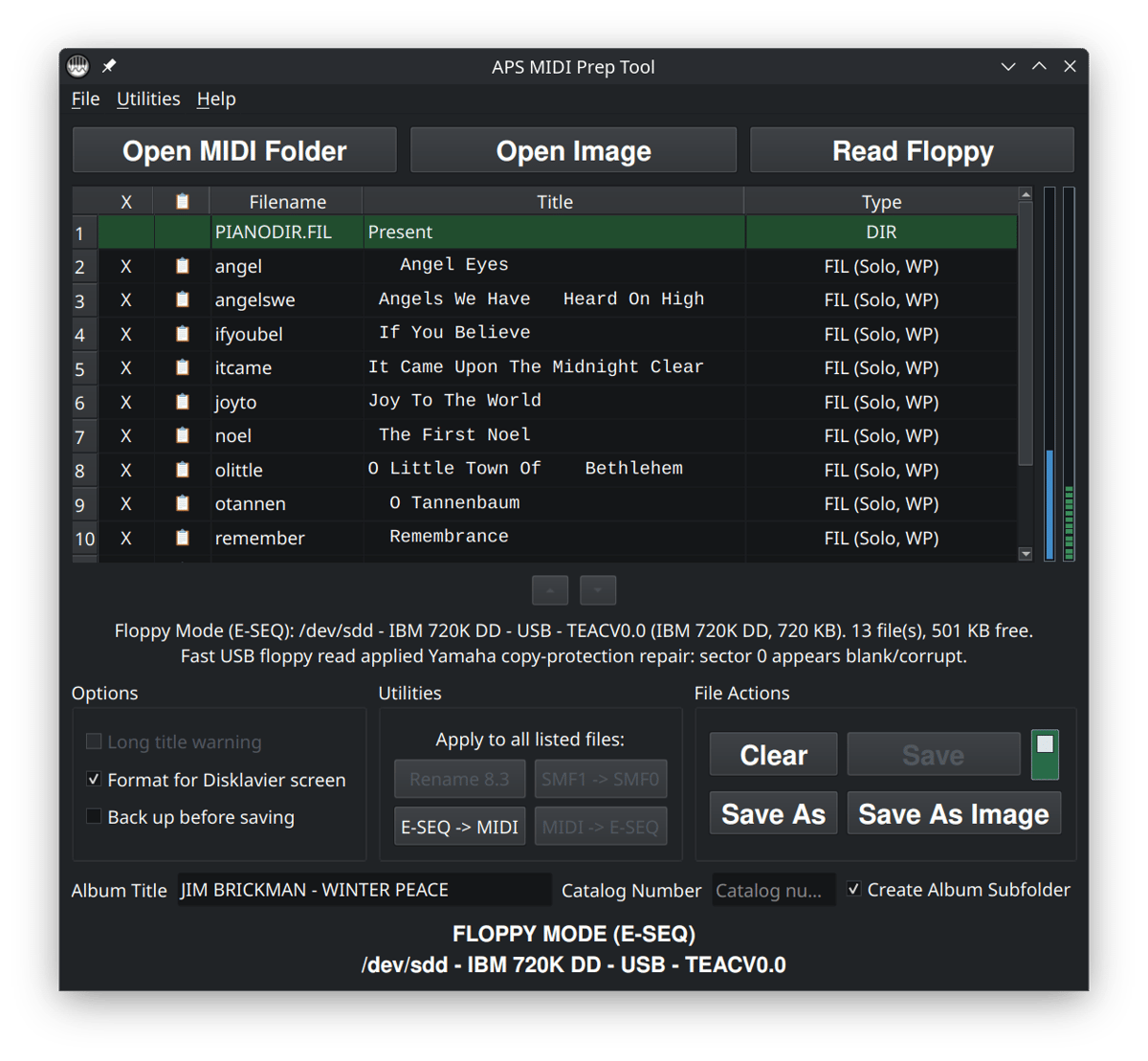
APS MIDI Prep Tool is a modern Windows and Linux utility for working with Yamaha Disklavier music files and disks. It supports MIDI, E-SEQ, PIANODIR.FIL, Yamaha PianoSoft floppies, HFE images, Nalbantov USB drives, Gotek emulators, and Greaseweazle imaging workflows in one place.
My goal with APS MIDI Prep Tool was to take my own tool sets and workflows, and build an app that could neatly consolidate them into one, simple and user-friendly package.
Owners of Mark I and Mark II Disklaviers often need to convert between Yamaha E-SEQ files and standard MIDI files, but the process has traditionally been confusing and risky. APS MIDI Prep Tool makes these conversions easier, helps create the required PIANODIR.FIL directory files, and reduces the chance of mistakes caused by older, bug-prone software.
This page is the main landing page for APS MIDI Prep Tool. If you already know what you are trying to do, use the workflow links below. If you are not sure, the descriptions should help you find the right starting point.
Download APS MIDI Prep Tool
Latest version: v0.8.2
What APS MIDI Prep Tool does
APS MIDI Prep Tool helps with several common Disklavier and player piano file-preparation problems:
- Extract files from Yamaha and PianoDisc floppy disks. It can read personal recordings, Yamaha PianoSoft, and PianoDisc disks. It includes recovery tools that allow it to read even lightly corrupted floppy disks.
- Convert between MIDI and Yamaha E-SEQ formats. Prepare or refresh supporting files such as
PIANODIR.FILwhen needed. - Inspect, preview, and playback songs. It can show you the number of tracks or channels in a MIDI file, and can play the song back on your computer. It displays pedal usage, and can modify or soften pedaling.
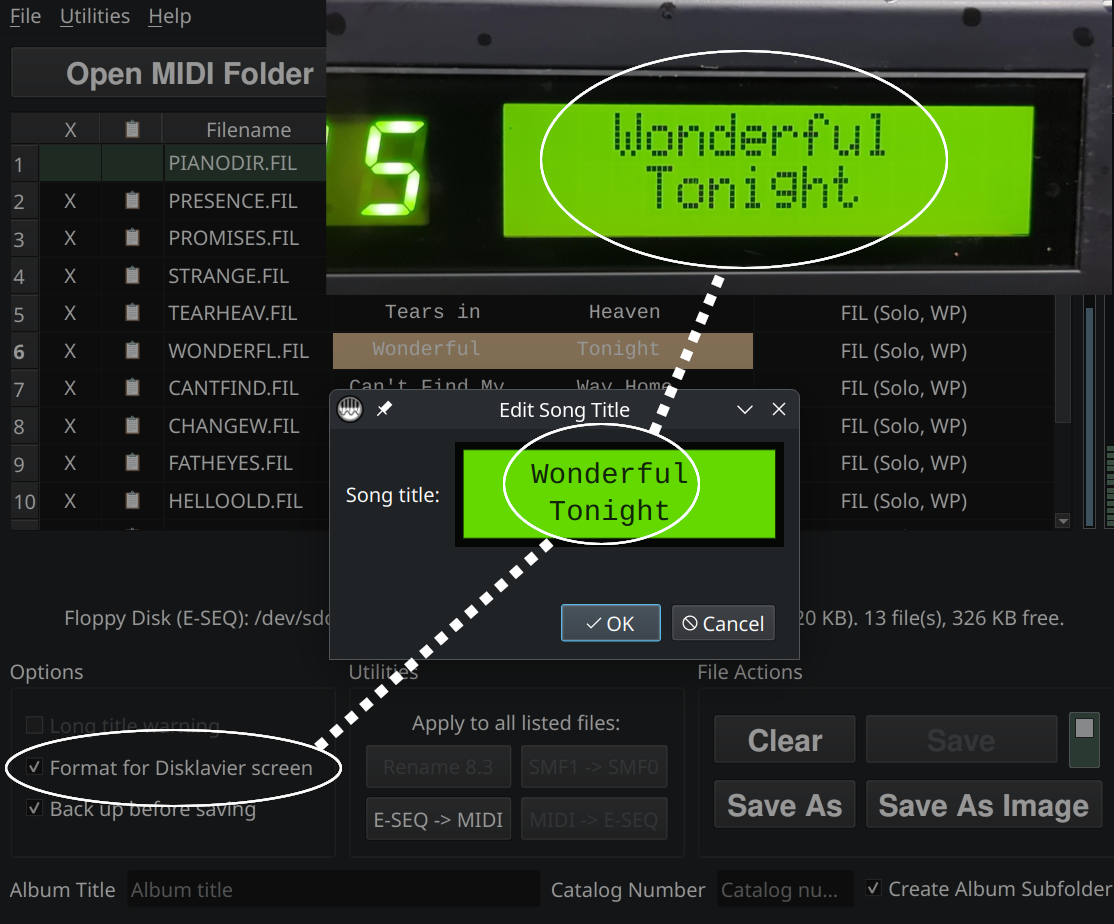
- Edit the MIDI title stored inside a MIDI file. These are the titles displayed on your player piano’s screen or app.
- Rename files into short DOS-style 8.3 filenames for older systems. Older player pianos require short filenames. Disks can behave like they’re corrupt if filenames are longer than eight characters.
- Convert MIDI Type 1 files to MIDI Type 0 for systems that need Type 0. Older player pianos can’t play Type 1 MIDI files. Even on newer systems, Type 0 files can behave more predictably. Additionally, it can merge all instruments to the piano channel.
- Work with floppy image files used by Nalbantov, Gotek, and similar emulators. You can use this tool in place of Disk Browser, greatly reducing the number of steps and difficulty in moving files onto your device. It can create disk sets for emulators from large sets of MIDI files, even converting to E-SEQ at the same time.
The tool covers a wide problem space, so the easiest way to use it is usually to start with a specific workflow rather than trying to learn every feature at once.
A few safety suggestions
Many Disklavier and player piano collections are old, rare, or personally important. Before making large changes, I recommend a cautious workflow.
- Work from a copy whenever possible.
- Keep the original floppy disk, image file, or MIDI folder untouched.
- Test a small number of files before preparing an entire collection.
- Use short, plain filenames for older systems.
- Check the displayed song title on the actual piano, not just on the computer.
This is especially important if the files came from an older PianoSoft disk, a customer archive, a family recording, or a disk that may be difficult to replace.
Want to play these files from your phone or tablet?
Once your files are converted and prepared, APS NoteCast can send standard MIDI files directly from an Android phone or tablet to many Yamaha Disklaviers, player pianos, digital pianos, and keyboards using Bluetooth MIDI or a compatible USB MIDI connection.
Support APS MIDI Prep Tool Development
APS MIDI Prep Tool is provided free of charge. If it has helped you preserve, organize, or convert your Disklavier music library, you can help support continued development and future updates. Support Development via PayPal.
Prefer Venmo? @AlexsPianoService
APS MIDI Prep Tool is free to use. If it has saved you time, recovered
a disk, prepared music for your Disklavier, or solved an unusual problem,
I'd love to hear about it. Your feedback also helps other piano owners
and technicians know what the tool can do.
Particularly useful: tell me which Disklavier model you used,
what you were trying to accomplish, and whether the tool worked.
Has APS MIDI Prep Tool helped you?
Common questions
Is this only for Disklaviers?
No, but Disklaviers are the main reason I built it. Some features may also be useful for other player piano systems, MIDI file collections, or floppy emulator workflows. It also understands some other types of E-SEQ (including Clavinova MDA files).
Does renaming a file change what the piano displays?
Not always. Some systems show the filename, while others show the internal MIDI title stored inside the file. Most Yamaha Disklaviers and PianoDisc systems rely on the MIDI title in the file itself, rather than the filename. APS MIDI Prep Tool can help with both, but they are not the same thing.
Why do older systems care about MIDI Type 0?
Some older player systems expect MIDI Type 0 files and may behave unpredictably with MIDI Type 1 files. If a song plays oddly, only plays one hand, or does not load correctly, checking the MIDI type is a good place to start.
Can I use this with Nalbantov or Gotek?
Yes, that is one of the important uses for the tool. APS MIDI Prep Tool can work with supported floppy image files so you can prepare virtual disks for floppy emulators, depending on the format and the system you are using.
Should I use Save, Save As, or Save As Image?
Use Save when you intentionally want to write changes back to the current files. If you want to write the changed copies elsewhere, use Save As. Use Save As Image when you want to create or update a floppy image for systems like Nalbantov or Gotek.
What if I am not sure which workflow applies?
Start with what you physically have: loose MIDI files, a floppy image file, or a real floppy disk. Then choose the matching workflow above. If you are working with something rare or important, make a backup first and test with copies.
What languages does APS MIDI Prep Tool support?
APS MIDI Prep Tool currently supports the following languages: English, Spanish, French, German, Italian, Bulgarian, Brazilian Portuguese, Dutch, Polish, Japanese, Korean, and Simplified Chinese. This allows musicians, technicians, and Disklavier owners around the world to use the software in their preferred language with a fully localized interface.
Why can’t I click the Save button?
The Save button is disabled when APS MIDI Prep Tool is treating the disk or file as protected or read-only. If you would like to write to the disk, click the small write-protect toggle to the right of the Save button.
If that toggle becomes an annoyance, you can disable the automatic behavior under File > Write Protection > Auto Write-Protect. Once Auto Write-protect is turned off, APS MIDI Prep Tool will allow changes to be saved when the disk or file is otherwise writable.
Does APS MIDI Prep Tool support custom keyboard shortcuts?
APS MIDI Prep Tool was designed with ease-of-use in mind. However, I appreciate that some power users are processing hundreds of floppy disks at a time and would like ways to speed up their workflow.
APS MIDI Prep Tool supports keyboard shortcuts for many common actions, and most of them can be viewed or customized under Settings > Keyboard Shortcuts. From there, you can review the current shortcuts, assign your own preferred key combinations, or reset everything back to the defaults if needed.
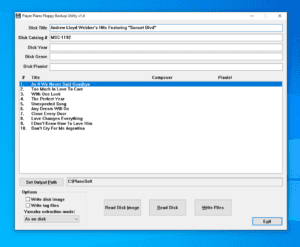
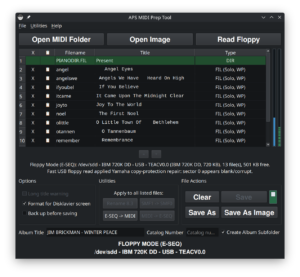
Hello Alex, thank you so much for this great tool. I would like you opinion of the workflow plan I am implementing. I have about 95 floppies to back up and convert to a standard format (MIDI) which I am using for Pianostream too my Mark III system (vintage 2000). I can send a full document, but in a nutshell, 1) Read Pianosoft floppy, 2) Save as image as a BIN type, my insurance backup, 3) Convert ESEQ to MIDI, 4) Save as in default Catalog-Name format subfolder, 5) Then copy BIN file into that folder. Item 5 would not be needed if the Save As Image created a subfolder just as the Save as does. Your thoughts? Only other issue, I would like to make a donation for this software, I really respect your creating this and making it available. Can you add a donations link? Thanks
Hello Jack,
Thank you very much. I appreciate both the kind words and the thoughtful feedback!
Your workflow makes sense. The BIN image is a good archival master because it preserves the original floppy disk structure, while the converted MIDI files provide convenient playback copies for PianoStream.
Your observation about the sub-folder is a good one. My only hesitation is that many people also use the APS MIDI Prep Tool to prepare or edit images for Nalbantov USB floppy-disk emulators, which cannot read images stored inside sub-folders.
I’ll add an optional checkbox allowing Save as Image to create or use the same Catalog-Name sub-folder as the regular Save As function. That would eliminate the manual copying step for projects such as your 95-disk collection without changing the default behavior needed by most USB floppy-emulator users. I plan to include that option in the next release.
Thank you also for offering to support development of the software. I will add a voluntary support link to the page. In the meantime, you can use either of the following:
My PayPal
Venmo: @AlexsPianoService
Thank you!
Hello Alexander,
Thanks for the PayPal link, done!
One other suggestion, it would be nice to have another option for MIDI file naming, “Long file name” such as what PPFBU has. The 8.3 option is definitely needed, but for someone playing MIDI files on a PC or mobile phone players the descriptive file name is needed. Easily took care of this with another program but having it as button or checkbox option in APS MIDI would be a nice addition.
Jack
Hello Jack,
Thank you for the suggestion! That’s a good addition, and I’ll include a long filename option in the next version of APS MIDI Prep Tool alongside the existing 8.3 naming option.
I really appreciate the feedback. It’s been very helpful in refining the program.
Thank you,
Alexander
I just wanted to let you know that this feature is now included in APS MIDI Prep Tool as of version 0.8.0. Thank you very much for the suggestion!