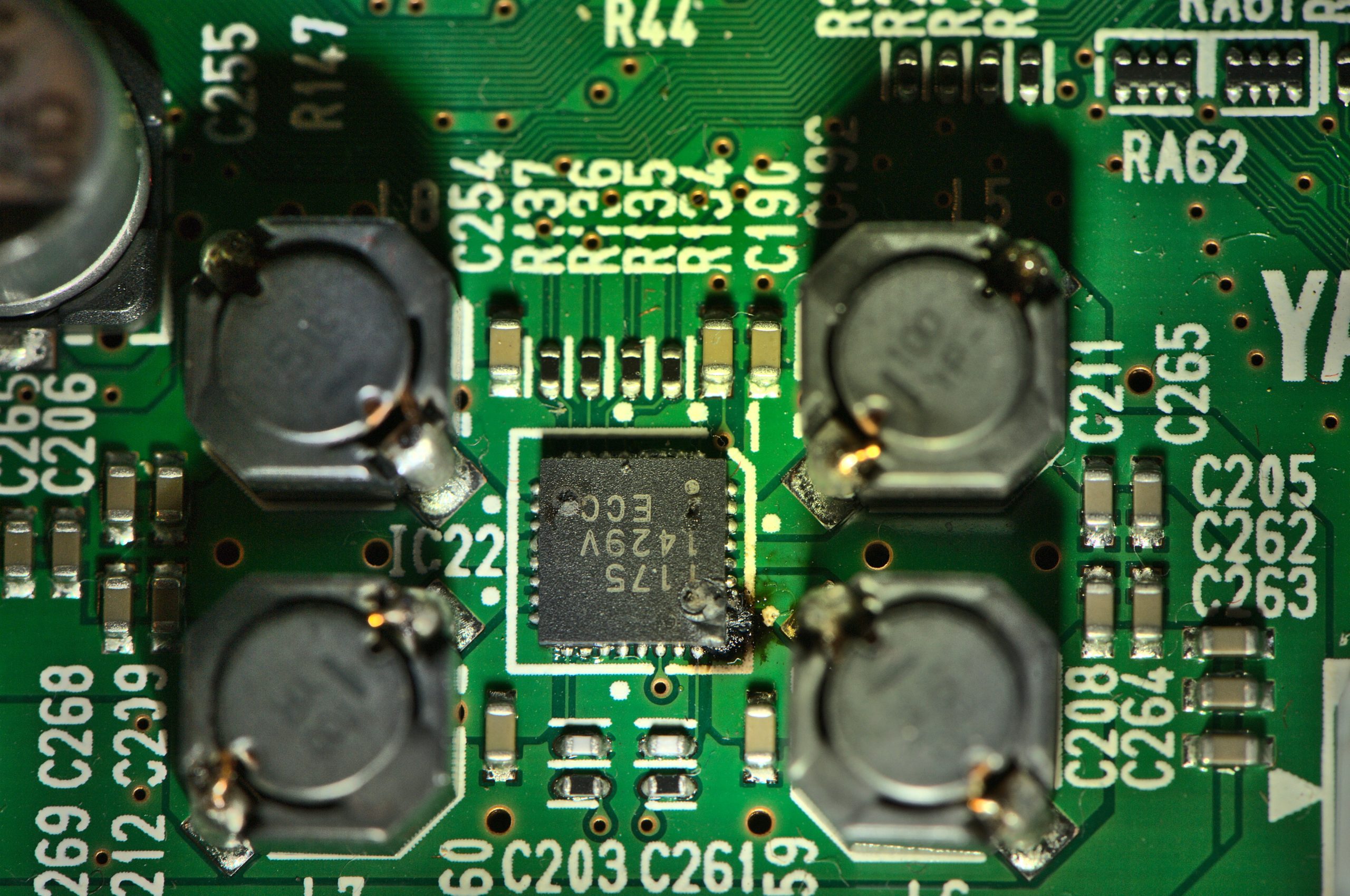
A customer recently brought in their Yamaha P-105, complaining of no sound. Occasionally, it would emit a scratchy noise, but even that was inconsistent. After opening it up, I found the culprit: The amplifier chip on the DM board had burned out.
Other possible causes
If you have a P-105 with no sound, then before you start suspecting the main board, there are several things to check! You might try factory resetting it (power it on while holding down the top C key). Confirm that there are no headphones connected or adapters still stuck in the headphone jack. And try moving the volume control up and down to see if the sound cuts in and out—damaged volume sliders are relatively common.
Why did the amplifier burn out?
The amplifier chip is a small surface-mount device (SMD) mounted directly on the DM board. I’ve attached a picture of the burned chip for reference. In this case, the fix was straightforward: replace the DM board with Yamaha part ZJ257000. You can purchase this from Yamaha 24×7, or other online suppliers such as Syntaur.
These amplifiers burn out for a few common reasons. First, they’re often driven to their limits: Higher volume generates more heat. Since the P-105 is a compact digital piano, there isn’t much room for heat dissipation, so the chip ends up taking the brunt of it. Repeated thermal cycling (heating up and cooling down) weakens the chip and its solder joints, eventually leading to failure. Power surges and aging components don’t help either.
(These are my observations, and aren’t officially sanctioned by Yamaha.)
In this case, I could tell something was wrong just by smell when I powered the keyboard on. There was a distinct odor of heat and ozone coming from the unit, which can be a giveaway for a burned-out amplifier or other overheated components.
What can I do to prevent this problem?
If you’re a Yamaha P-105 owner, there are a few ways to extend the life of your instrument. Keep the keyboard in a well-ventilated space to prevent heat buildup, and avoid maxing out the volume for long periods. Always use a surge protector to avoid power spikes.
You can contact me directly if you’re in Maine and looking to fix your keyboard.